New project wizard
Use the Flowset project wizard to generate a new BPM-application project in IntelliJ IDEA.
|
Basic project configuration
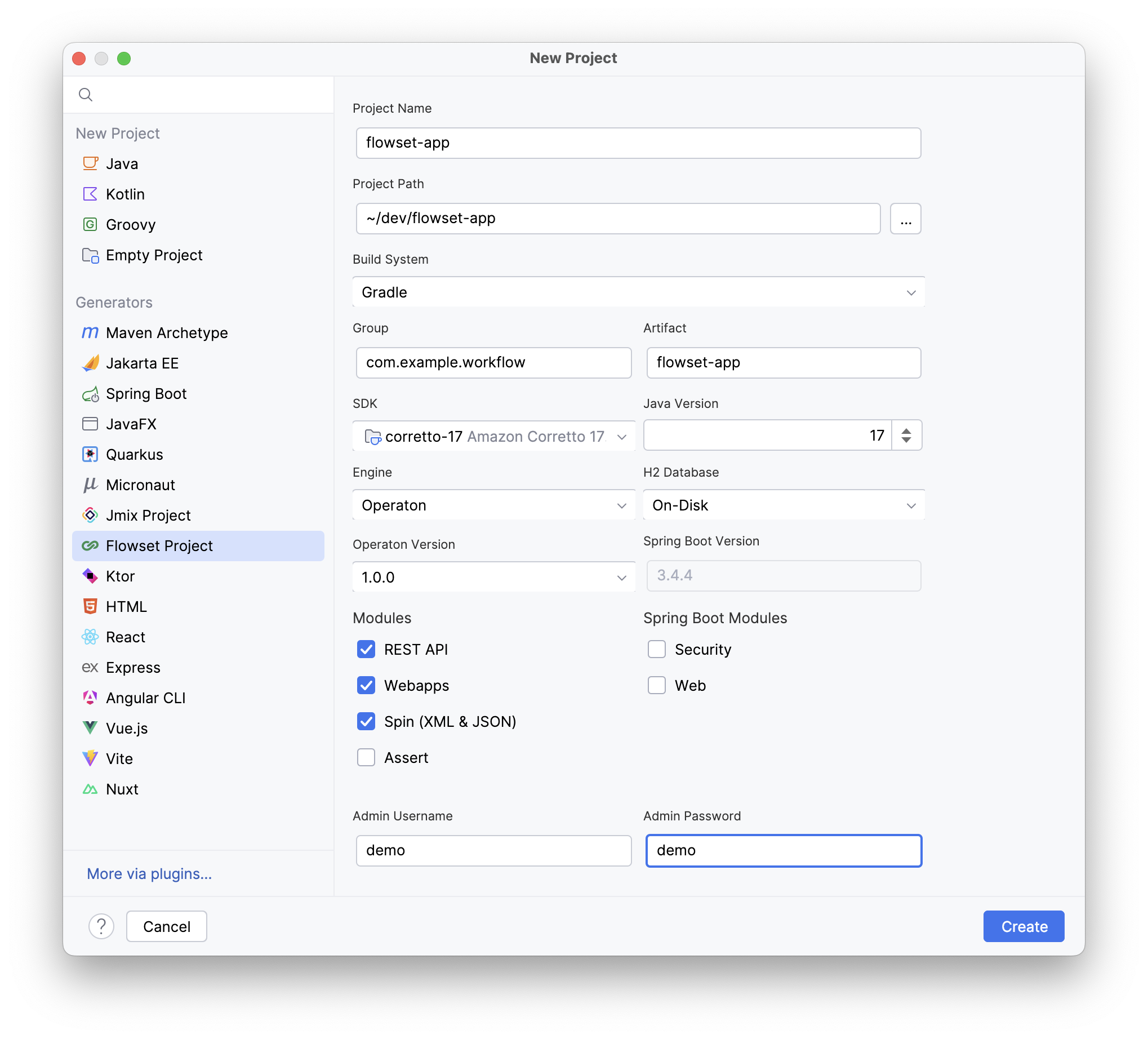
Project Name: |
Specify a name for your project. |
Project Path: |
Specify the filesystem path for your project. |
Build System: |
Select Gradle or Maven build system. |
Group: |
Specify the unique group identifier (preferably reverse domain name you control, e.g., |
Artifact: |
Specify the artifact name within the group (typically matches project name). |
SDK: |
Select Java SDK for the project. |
Java Version: |
Specify Java language level. |
Engine: |
Select process engine: Camunda or Operaton. |
H2 Database: |
Select H2 database type: On-Disk (persistent) or In-Memory (volatile). |
Camunda (Operaton) Version: |
Select process engine version (for Camunda or Operaton). |
Admin Username: |
Specify username for automatic admin creation. On first startup, Camunda checks for existing users with this ID. If not found, creates a new administrative account. Privileges:
|
Admin Password: |
Specify password for the admin user. |
|
Auto-creating users is a development-only feature. Not for Production Use! In production environments:
Security Vulnerability Warning: storing passwords in
|
Modules
REST API |
Provides access to all relevant engine interfaces. Enables interaction with the engine via HTTP requests. |
Webapps |
Includes standard Camunda modules:
|
Spin (XML & JSON) |
Camunda Spin is a JVM library for simplified XML and JSON processing in Java and JVM-based languages (e.g., Groovy, JavaScript). Offers a fluent API with lightweight data format wrappers. |
Assert |
Includes testing libraries:
|
Security |
Spring Boot Security provides authentication and authorization for Camunda 7 projects. Secures access to Cockpit, Tasklist, and Admin interfaces, ensuring only authorized users can manage processes. |
Web |
The Spring Boot Web module adds:
Automatically integrates with camunda-bpm-spring-boot-starter. |
|
When adding Spring Boot Security, the generated default WebSecurityConfiguration fully opens access to all endpoints without authentication. Never use it in production without modifications. Always configure authentication, authorization, and CORS policies according to security requirements. |